To assign a description to a course:
- Open the course record.
- Enter the catalog code into the Catalog Code field on the course record. Note: you can enter the starting characters then tab out of the field and the system will return catalog records that start with your value, for you to select the appropriate one.
- Click the Save button to save your change to the course record.
- You can now press the Description button to open the Catalog record and see the course description.
Note: you may also view the course description from the Registration screen with the Catalog button (mid screen to the right of the CEUS field).
Related Courses
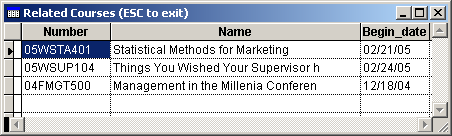
If you entered any Related courses--AND--you have sections of the courses offered in the future, click the See Also button (top of screen to the right of the registrant's name). This opens the list of Related courses allowing you to inform the registrants about other courses in which they might be interested.
 Related Topics